Public beta · Native macOS app

Your Razer lighting, finally on your Mac.

Control the RGB lighting on your Razer keyboard, mouse, and headset from an app built for macOS. No Synapse, no account, and it runs on Intel Macs too.

Pay once, no subscription macOS 13 or later Apple Silicon and Intel
Try a profile
RGB Studio on macOS showing a Razer Ornata V3 TKL with a custom lighting profile and the effects panel
120supported Razer models
UniversalApple Silicon and Intel in one app
macOS 13or later, including Ventura and Sonoma
8interface languages
≈6 MBno drivers, no Synapse, no OpenRGB
Why it exists

You work on a Mac. You game on Razer. They never talked.

If your work machine is a Mac, buying a Windows PC just to change your keyboard color makes no sense. And until now, the Mac options either left you out or were a pain to use.

Your Mac gets left out

Synapse for Mac is a Preview and requires an Apple Silicon Mac with macOS 15 or later. If you have an Intel Mac or macOS 13–14, there's no official version for you.

Free still costs you time

Cross-platform open source tools work, but they aren't made for the Mac: technical menus, no preview, and lots of trial and error.

RGB Studio fixes that

A native, lightweight, good-looking app that recognizes your Razer the moment you plug it in and lets you pick colors, effects, and profiles in seconds.

“I built it because I had a Mac, a Razer keyboard and mouse, and no app that worked for me.” — Creator of RGB Studio
Features

Everything your lights need. Nothing they don't.

Built like a real Mac app: fast, clear, and with your actual devices on screen.

Live preview

See your devices with the lighting they have right now. Change a color and watch it update on screen and on your desk at the same time.
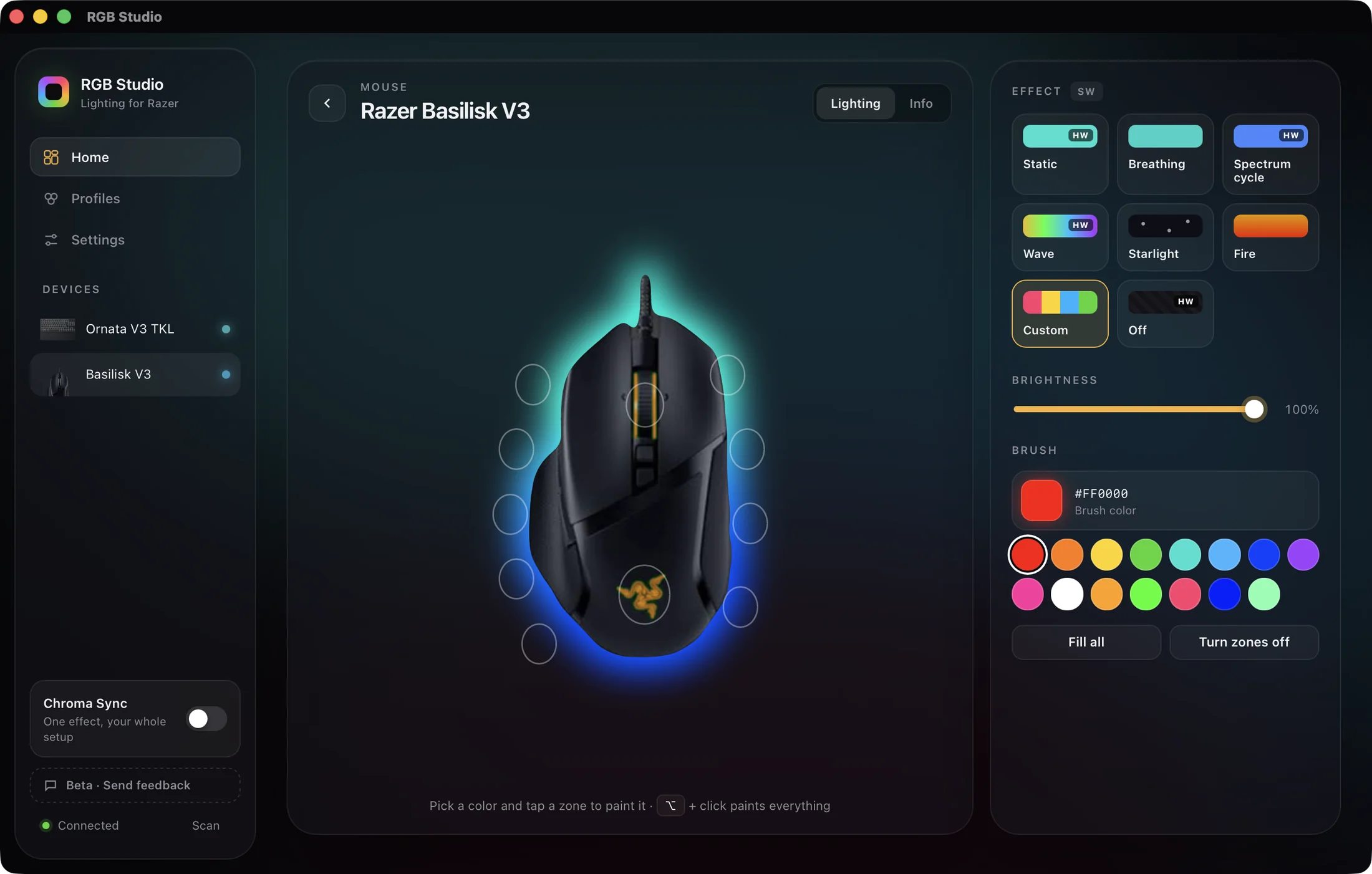
A Razer Basilisk V3 in RGB Studio with its live underglow and paintable zones

One-click profiles

Save combos for your whole setup and switch between them instantly. Star your favorites to keep them close.
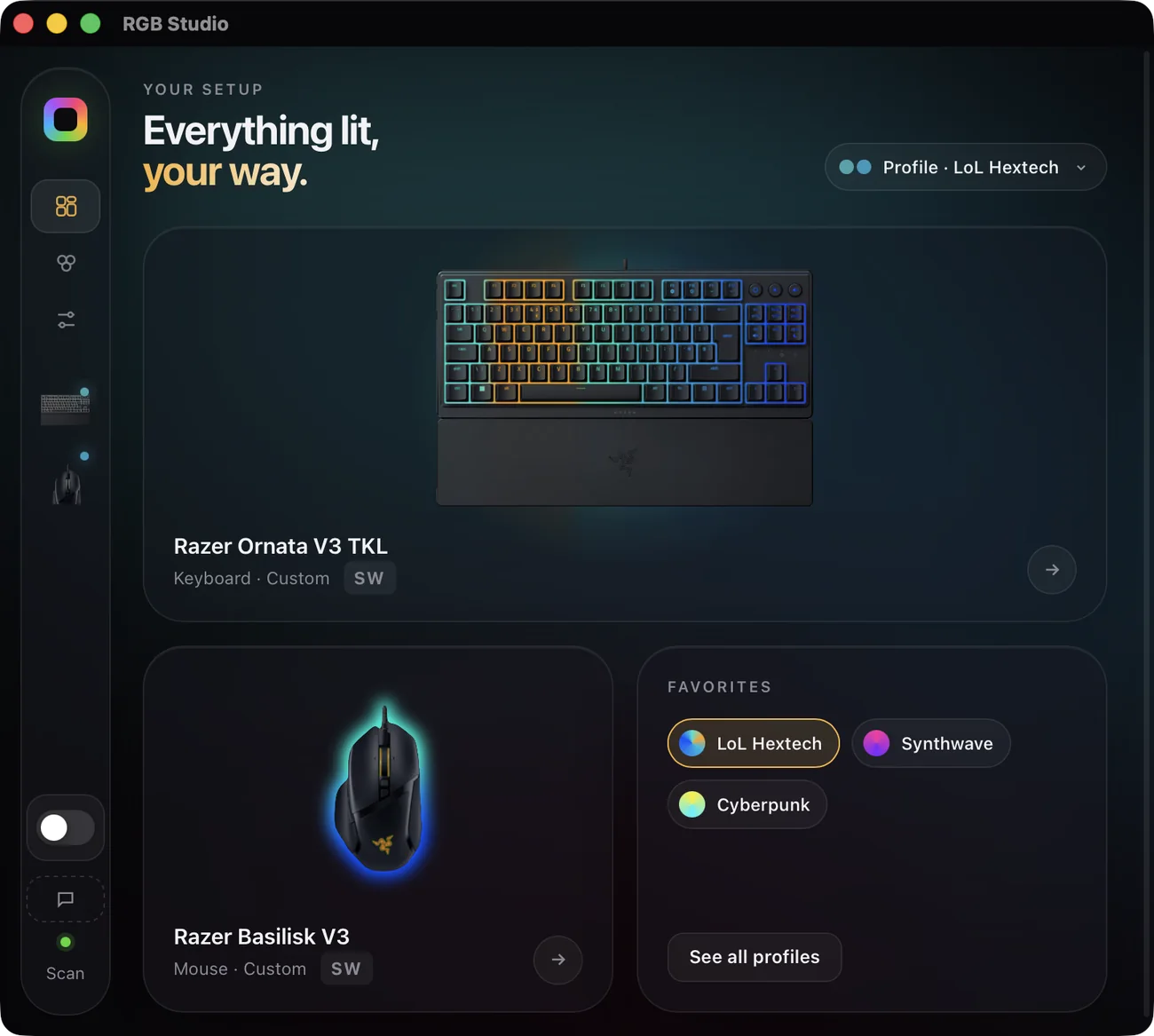
RGB Studio home screen with devices and favorite profiles

Gradient and zone editor

Drag color stops, paint zone by zone, or mix both. See every change live before you save.
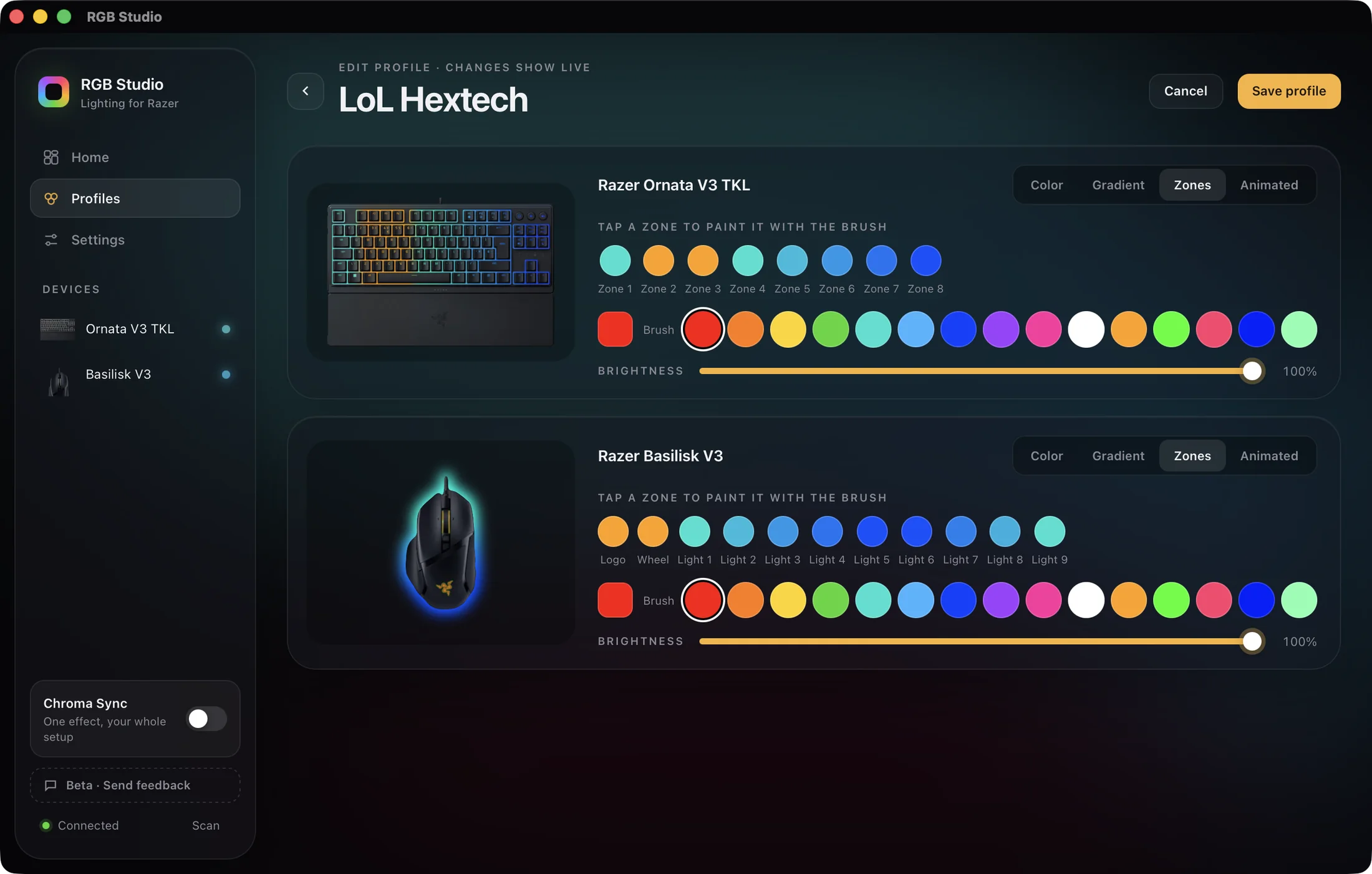
RGB Studio profile editor painting zones on a Razer keyboard and mouse

Your profile library

Drag to reorder, edit them anytime, and apply any one with a click.
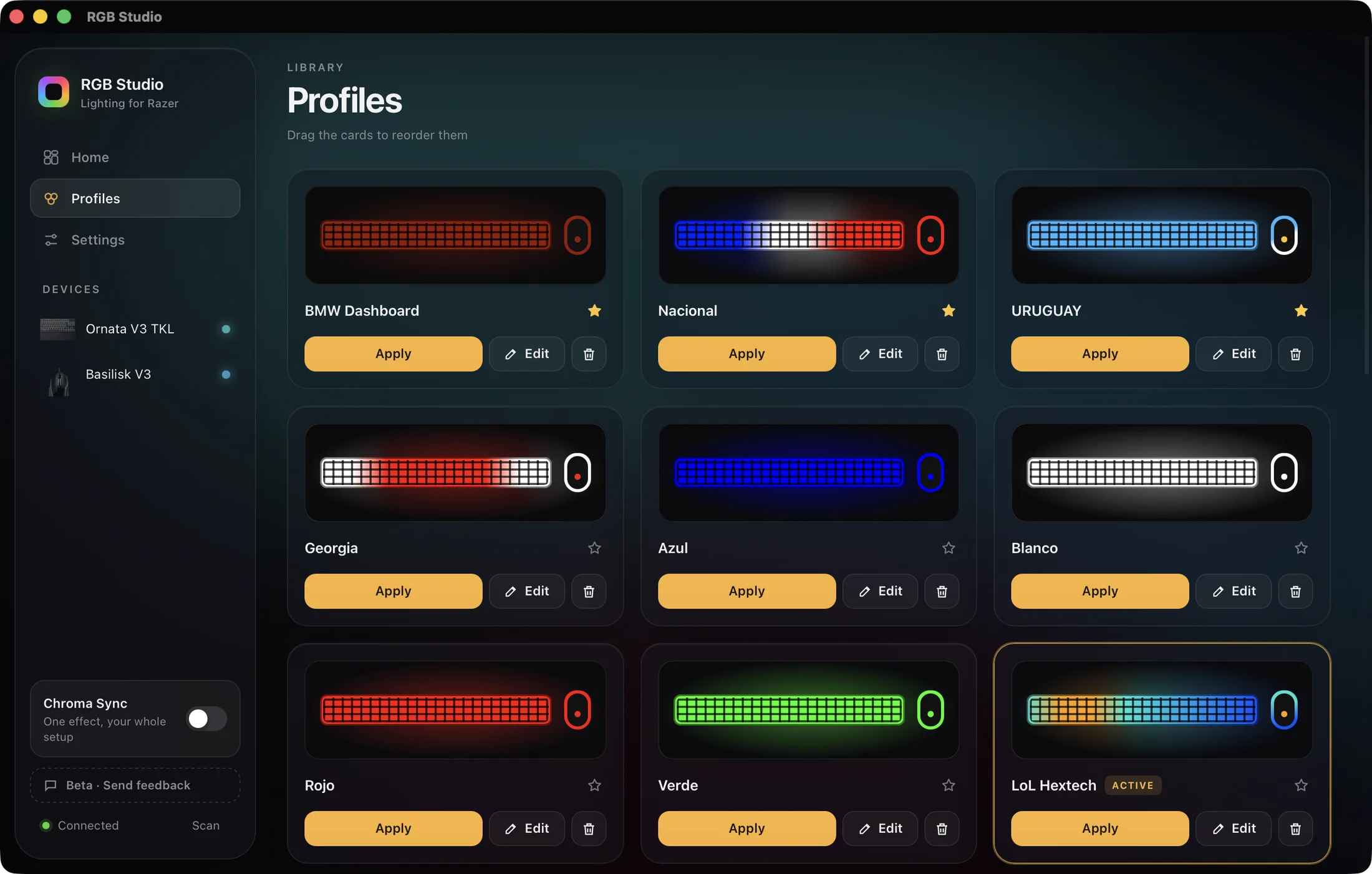
Lighting profile library in RGB Studio

Your whole setup in sync

One effect across all your devices, with the wave flowing from one to the next.

Starts with your Mac

Applies your profile at login and keeps running in the background, with no extra windows or icons.

Your language

Follows your Mac's language.

ESENPTFRITDERUUK
Static HW
Breathing HW
Spectrum HW
Wave HW
Reactive HW
Starlight
Fire
Gradient
Per zone

HW: the effect runs on your device, not your Mac. Availability depends on the model.

How it works

From download to lights on in a minute.

01

Buy and download

Pay once and download the app instantly. It's only about 6 MB.

RGB-Studio.dmg≈6 MB
02

Drag it to Applications

Just like any Mac app. No installers, no drivers, and no account to create.

During the beta, the first time you open it, macOS asks you to confirm in Settings → Privacy & Security → “Open Anyway”.
03

Plug in your Razer

The app recognizes it on its own, with its photo and zones. Connect it later and it shows up in seconds.

USBWireless receiver
04

Pick a profile. Done.

Apply a built-in profile or create your own. Turn on “Start with macOS” and forget about it.

LoL HextechDota 2CS2
Compatibility

120 Razer models. Find yours.

Keyboards, mice, headsets, mouse pads, and more. If yours isn't listed, ask and we'll add it.

Keyboards 42

  • Razer BlackWidow 2019
  • Razer BlackWidow Elite
  • Razer BlackWidow V3
  • Razer BlackWidow V3 Mini (Wired)
  • Razer BlackWidow V3 Mini (Wireless)
  • Razer BlackWidow V3 Pro (Wired)
  • Razer BlackWidow V3 Pro (Wireless)
  • Razer BlackWidow V3 TKL
  • Razer BlackWidow V4 75% (Wired)
  • Razer BlackWidow V4 Low Profile TKL (Wired)
  • Razer BlackWidow V4 Low Profile TKL (Wireless)
  • Razer BlackWidow V4 Pro 75% (Wired)
  • Razer BlackWidow V4 Pro 75% (Wireless)
  • Razer BlackWidow V4 TKL (Wired)
  • Razer BlackWidow V4 TKL (Wireless)
  • Razer BlackWidow V4 X
  • Razer Cynosa Chroma
  • Razer Cynosa Lite
  • Razer Cynosa V2
  • Razer DeathStalker V2
  • Razer DeathStalker V2 Pro (Wired)
  • Razer DeathStalker V2 Pro (Wireless)
  • Razer DeathStalker V2 Pro TKL (Wired)
  • Razer DeathStalker V2 Pro TKL (Wireless)
  • Razer Huntsman
  • Razer Huntsman Elite
  • Razer Huntsman Mini
  • Razer Huntsman Mini Analog
  • Razer Huntsman Tournament Edition
  • Razer Huntsman V2
  • Razer Huntsman V2 Analog
  • Razer Huntsman V2 TKL
  • Razer Huntsman V3 HE Magnetic Mini
  • Razer Huntsman V3 Pro
  • Razer Huntsman V3 Pro TKL White
  • Razer Ornata Chroma
  • Razer Ornata Chroma V2
  • Razer Ornata V3
  • Razer Ornata V3 rev2
  • Razer Ornata V3 TKL TESTED
  • Razer Ornata V3 X
  • Razer Ornata V3 X Rev2

Mice 49

  • Razer Abyssus Elite DVa Edition
  • Razer Abyssus Essential
  • Razer Basilisk
  • Razer Basilisk Essential
  • Razer Basilisk Ultimate
  • Razer Basilisk Ultimate (Wireless)
  • Razer Basilisk V2
  • Razer Basilisk V3 TESTED
  • Razer Basilisk V3 35K
  • Razer Basilisk V3 Pro (Wired)
  • Razer Basilisk V3 Pro (Wireless)
  • Razer Basilisk V3 Pro 35K (Wired)
  • Razer Basilisk V3 Pro 35K (Wireless)
  • Razer Basilisk V3 Pro 35K Phantom Green Edition (Wired)
  • Razer Basilisk V3 Pro 35K Phantom Green Edition (Wireless)
  • Razer Basilisk V3 X HyperSpeed
  • Razer Cobra
  • Razer Cobra Pro (Wired)
  • Razer Cobra Pro (Wireless)
  • Razer DeathAdder Elite
  • Razer DeathAdder Essential
  • Razer DeathAdder Essential (White Edition)
  • Razer DeathAdder Essential V2
  • Razer DeathAdder V2
  • Razer DeathAdder V2 (Wired)
  • Razer DeathAdder V2 (Wireless)
  • Razer DeathAdder V2 Mini
  • Razer Lancehead 2017 (Wired)
  • Razer Lancehead 2017 (Wireless)
  • Razer Lancehead 2019 (Wired)
  • Razer Lancehead 2019 (Wireless)
  • Razer Lancehead Tournament Edition
  • Razer Mamba 2018 (Wired)
  • Razer Mamba 2018 (Wireless)
  • Razer Mamba Elite
  • Razer Mamba Hyperflux (Wired)
  • Razer Mouse Bungee V3 Chroma
  • Razer Naga Classic
  • Razer Naga Left Handed
  • Razer Naga Pro (Wired)
  • Razer Naga Pro (Wireless)
  • Razer Naga Pro V2 (Wired)
  • Razer Naga Pro V2 (Wireless)
  • Razer Naga Trinity
  • Razer Viper
  • Razer Viper 8kHz
  • Razer Viper Mini
  • Razer Viper Ultimate (Wired)
  • Razer Viper Ultimate (Wireless)

Headsets 5

  • Razer Kraken Kitty Edition
  • Razer Kraken Kitty V2 Pro
  • Razer Kraken V3
  • Razer Kraken V3 HyperSense
  • Razer Kraken V3 X

Mouse pads 7

  • Razer Firefly Hyperflux
  • Razer Firefly V2
  • Razer Firefly V2 Pro
  • Razer Goliathus
  • Razer Goliathus Chroma 3XL
  • Razer Goliathus Extended
  • Razer Strider Chroma

Other 17

  • Lian Li O11 Dynamic - Razer Edition
  • Razer Base Station Chroma
  • Razer Base Station V2 Chroma
  • Razer Charging Pad Chroma
  • Razer Chroma HDK
  • Razer Chroma PC Case Lighting Kit
  • Razer Core X
  • Razer Laptop Stand Chroma
  • Razer Laptop Stand Chroma V2
  • Razer Leviathan V2
  • Razer Leviathan V2 X
  • Razer Mouse Dock Chroma
  • Razer Mouse Dock Pro
  • Razer Nommo Chroma
  • Razer Nommo Pro
  • Razer Tartarus Pro
  • Razer Tartarus V2
We couldn't find “”. Ask us to add it and we'll let you know.
120 models · TESTED = verified hands-on with the real device Not listed? Request it
Comparison

The option that works on your Mac.

How RGB Studio stacks up against the other ways to control Razer lighting on macOS.

Comparison of RGB Studio, Razer Synapse for Mac, and OpenRGB
RGB StudioSynapse for Mac (Preview)OpenRGB
Apple Silicon Macs
Intel MacsApple Silicon only
macOS 13 Ventura and 14 Sonomaneeds macOS 15+
Built for Mac onlycross-platform
PriceUS$8.79one-timeFreeopen source

Synapse for Mac, per Razer's FAQ: Preview, Apple Silicon only, macOS 15 or later. OpenRGB, per openrgb.org: free, open source and cross-platform. A dash means we don't state it here: check each official site. Razer and Synapse are trademarks of Razer Inc.

Full comparisons: RGB Studio vs Synapse for Mac · RGB Studio vs OpenRGB

Pricing

Pay once. Yours forever.

Costs less than a mouse pad. No subscriptions, no accounts, no surprises.

RGB Studio · Beta
US$8.79
One-time
  • All 120 supported Razer models
  • Unlimited profiles, gradient editor, and effects
  • Apple Silicon and Intel, macOS 13 and later
  • Every update during the beta
  • A direct line to the developer: your feedback shapes what's next
Buy now US$8.79
Secure checkout · Instant download
To put it in perspective
A Windows PC just for your lightingUS$500+
A new RGB mouse padUS$40+
One month of most subscription appsUS$10+
RGB Studio, foreverUS$8.79
Open beta

Build it with us.

RGB Studio is in beta and we read every message. Tell us what's broken, what you'd like us to add, or which model you want supported.

  • Something not working? Tell us which device and what happened; we'll fix it in the next release.
  • Got an idea? The most-requested features are the first ones we build.
  • Missing your model? Request it and we'll add it.
You came from the app, so we've filled in the technical details.
What's it about?
We only use this info to improve RGB Studio. We never share it.
Common questions

What everyone asks.

Do I need Razer Synapse or OpenRGB?

No. RGB Studio talks directly to your Razer devices. It doesn't need Synapse, OpenRGB, drivers, or an account. If you have Synapse or another lighting app open, quit it so they don't fight each other.

Does it work on Intel and Apple Silicon Macs?

Yes. It's a universal app: the same download runs on Macs with M-series chips (Apple Silicon) and with Intel processors, on macOS 13 Ventura or later.

Is my model supported?

Look it up in the compatibility list: there are 120 models across keyboards, mice, headsets, mouse pads, and accessories. If yours isn't there, request it.

Is it a one-time fee?

Yes. You pay US$8.79 once, with no subscription. It includes every update during the beta.

Why does macOS ask me to confirm the first time I open it?

During the beta, the app isn't notarized by Apple yet. The first time, go to System Settings → Privacy & Security and click “Open Anyway”. It's a one-time step, and after that it opens normally.

Does the lighting stay on if I quit the app or restart?

Hardware effects run on the device itself. App-driven animated effects (and your profiles) stay on if you turn on “Start with macOS”: the app applies your profile at login and keeps running in the background, with no window.

Any special permissions?

For most devices, no. Some Kraken headsets may ask for the macOS Input Monitoring permission; the app lets you know and takes you straight to the right spot in Settings.

Does it work with wireless devices?

Many wireless models work through their USB receiver: they're marked “Wireless” in the list. Lighting can't be controlled over Bluetooth.

Can it set DPI, macros, or buttons?

For now, RGB Studio focuses on lighting. If you'd like it to do more, let us know: the most-requested features are the first ones we build.

Is RGB Studio made by Razer?

No. It's an independent product, not affiliated with or endorsed by Razer Inc. It works with Razer devices, but it isn't an official app.

Your Mac. Your Razer. Your colors.

Join the beta for a one-time US$8.79.